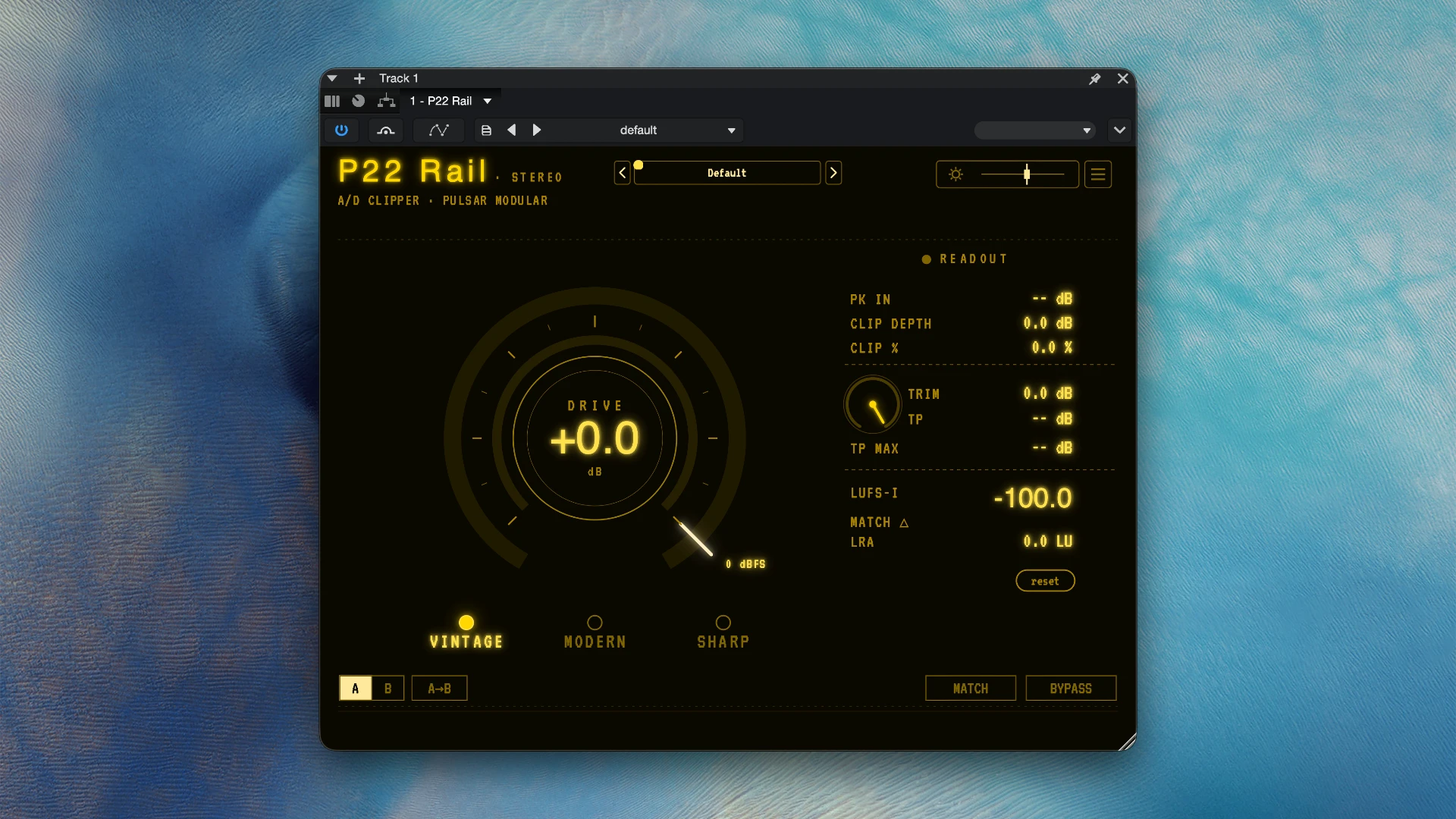
The Pulsar Modular P22 Rail is a sophisticated stabilising A/D (Analog-to-Digital) clipper plugin that lets you push mixes to commercial volume levels while preserving flawless transient detail. Audio engineers value it as a substitute for harsh, squashed limiting.

Three unique clipping “flavours” (operating modes) are included with the P22 Rail, each specifically designed for a certain type of audio content:

Modern: The clearest, most colourless choice. It works best on dynamically balanced tracks that only require a volume boost, as it provides transparent peak control and minimal coloration.

Sharp: Gives your transients a distinct edge and presence. It is intended for stuff that needs more “snap” and forward motion and is rhythmic or strongly produced.

Vintage: Adds harmonic richness and asymmetric warmth.

Tools & Workflow The plugin has an integrated level-matched snapshot capability to assist in making impartial, fair decisions between the modes (instead of just selecting the loudest). You can immediately monitor True Peak and LUFS while setting the appropriate delivery level by pressing MATCH, toggling BYPASS, and then adjusting the TRIM slider.

Details

Version 1.0.0
Developer Pulsar Modular
Activation (RG) K'ed by MORiA
Compatibility macOS 10.13 and later
Size 15 MB
Architecture ARM , x86 (64-bit)
Interface Language English

FAQ

Installation and activation instructions are included in the package (inside).
There are so many errors, we can't list them all here. Therefore, we've described all the solutions
Official updates may result in loss of activation unless otherwise stated in the installation instructions. To update the software from this website, you must download the new version of the software from here (if available) and install it over the version currently installed on your computer. This will preserve your activation and settings for the software.
To download large files, it is recommended to use any download manager, for example, FDM (Free Download Manager) For downloading from a file sharing service like Filen.io, it's not recommended to use Safari. Use Google Chrome or the aforementioned FDM browser, for example. To download files via torrent (.torrent file), you need a torrent client, such as Transmission or the aforementioned FDM. Please remember that providers may block access to some websites (1fichier.com, etc.). To bypass these blocks, it is recommended to use a VPN.
The site administration doesn't hack anything. That's the job of release teams and some enthusiasts. They're the ones responsible for ensuring updates are available. But you can hack software yourself by learning reverse engineering.
Definitely not in the comments. The site administration doesn't hack anything, and there's no order desk. However, you can order the software you need (not for free) in a special thread on forum.ru-board.com.
Open System Preferences -> General > Language & Region -> Applications - “+”. Select an app and language. This method works for most apps. The language in Adobe products is usually selected during the installation of the product itself. The language in games is usually changed in the game settings itself. There are exceptions. Don't hesitate to search for information online.
There are many options. The easiest is to use specialized app removal tools, such as App Cleaner & Uninstaller.
The site offers a paid service: remote assistance (via AnyDesk, Zoom, Skype) with the installation of any applications (not just those from this site) on any Mac or PC.

Leave a Comment

Version 1.0.0
Developer Pulsar Modular
Interface language English
Activation (RG) K'ed by MORiA
Compatibility macOS 10.13 and later
Architecture ARM , x86 (64-bit)
Size 15 MB
No threats found. Read more…
Published (edited): July 7, 2026 Views: 2