
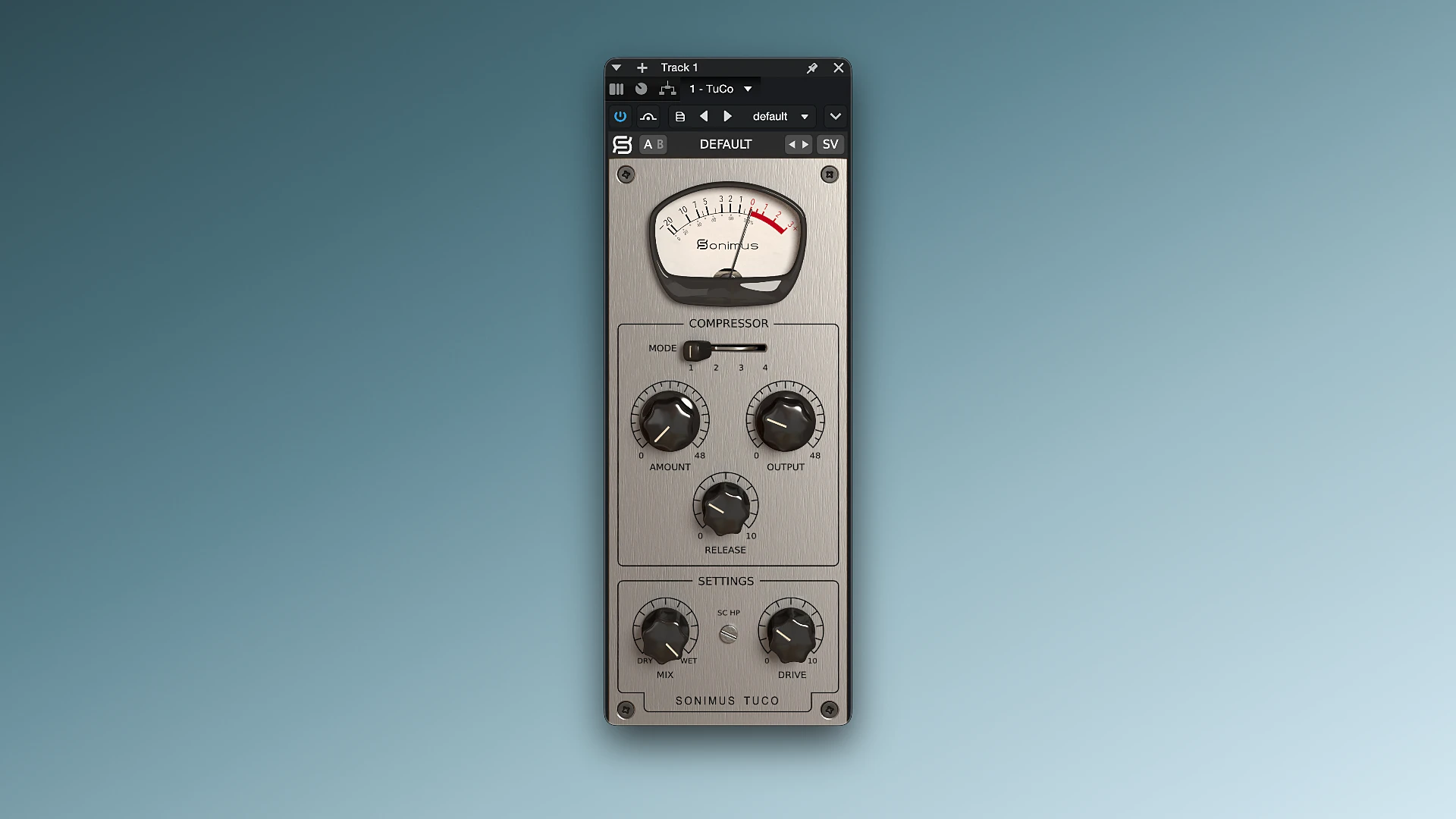
Sonimus TuCo is a very flexible tube compressor plugin in the vari-mu style that is renowned for its analog feedback topology and warm, transparent sound. It is frequently utilized for tracking, mixing, and mastering vocals, instruments, and entire mixes. It ranges from delicate, organic compression to rich tube saturation.

It has never been simpler to achieve the unique sound of traditional tube compression. The Tuco plugin, which is based on tried-and-true tube technology, has a very straightforward interface, contemporary mixing capabilities, and a clear, warm, and clean sound.

Key Features:

  • It immediately unites all of your instruments, creating a tight, concentrated sound for your song.
  • Tuco is built on a special algorithm that accurately mimics the behavior of old vacuum tube devices.
  • At maximum levels, it gives the music a strong, forceful punch, while at low settings, it smoothes out loudness naturally and gently.
  • This plugin sounds fantastic in the last stages of song construction and is perfect for processing drums, vocals, or any other live instrument.
  • It may be used to record individual songs as well as to polish the final product before it is released because of its several stereo balancing options.

Important aspects of the plugin:

  • Based on vintage studio technologies, the sound signature is entirely tube-like.
  • There are four modes of operation: two hard volume limiting modes (slow and quick), fast and aggressive compression, and soft compression with slow turn-on.
  • Easy fade-out speed adjustment to change the effect’s speed from slow to fast.
  • Automatic volume leveling, which makes up for the sound level loss following processing.
  • Three stereo modes (separate left/right, vintage, and current stereo) for varying channel balance distribution.
  • Control the wet/dry mix to provide a parallel effect in two distinct modes.
  • An independent setting to provide a thick, pleasing tube distortion to the sound.
  • A button that instantly compares two settings so you may select the one that sounds the best.
  • An easy way to store both pre-made factory settings and your own.
  • Complete support for clear visuals on contemporary high-resolution screens.
  • Maximum optimization for instantaneous, delay-free computer functioning in real time.

Details

Version 1.1.1
Developer Sonimus
Activation (RG) k'ed by GUISEPPE
Compatibility macOS 10.15 and later
Size 35 MB
Architecture ARM , x86 (64-bit)
Interface Language English

FAQ

Open the downloaded file and follow the standard installation procedure.
There are so many errors, we can't list them all here. Therefore, we've described all the solutions (with pictures) in the article: Errors when installing applications on a Mac
Official updates may result in loss of activation unless otherwise stated in the installation instructions. To update the software from this website, you must download the new version of the software from here (if available) and install it over the version currently installed on your computer. This will preserve your activation and settings for the software. Read more in the article: Updating pirated apps
To download large files, it is recommended to use any download manager, for example, FDM (Free Download Manager) For downloading from a file sharing service like Filen.io, it's not recommended to use Safari. Use Google Chrome or the aforementioned FDM browser, for example. To download files via torrent (.torrent file), you need a torrent client, such as Transmission or the aforementioned FDM. Please remember that providers may block access to some websites (1fichier.com, etc.). To bypass these blocks, it is recommended to use a VPN.
The site administration doesn't hack anything. That's the job of release teams and some enthusiasts. They're the ones responsible for ensuring updates are available. But you can hack software yourself by learning reverse engineering.
Definitely not in the comments. The site administration doesn't hack anything, and there's no order desk. However, you can order the software you need (not for free) in a special thread on forum.ru-board.com.
Open System Preferences -> General > Language & Region -> Applications - “+”. Select an app and language. This method works for most apps. The language in Adobe products is usually selected during the installation of the product itself. The language in games is usually changed in the game settings itself. There are exceptions. Don't hesitate to search for information online.
There are many options. The easiest is to use specialized app removal tools, such as App Cleaner & Uninstaller. To remove Adobe products, use the Creative Cloud Cleaner Tool .
The site offers a paid service: remote assistance (via AnyDesk, Zoom, Skype) with the installation of any applications (not just those from this site) on any Mac or PC. Learn more...

Leave a Comment

Version 1.1.1
Developer Sonimus
Interface language English
Activation (RG) k'ed by GUISEPPE
Compatibility macOS 10.15 and later
Architecture ARM , x86 (64-bit)
Size 35 MB
No threats found. Read more…
Published (edited): June 3, 2026 Views: 3