The AI-powered mastering plugin Optimus by SSG Audio strikes a balance between creative control and technical accuracy. With its two main AI engines and specialized modules, it enables producers to swiftly make radio-ready masters without ever leaving their DAW.

  • The Optimus Mastering System
  • A polished final sound in a matter of minutes.
  • More clear and louder than before.
  • New levels of artificial intelligence.

Optimus offers a user-friendly workflow that seamlessly integrates the precision of artificial intelligence with your creative decisions. Two new intelligent modules form the foundation of the system. The first aid in frequency equalization is responsible for sound balance. The second produces the loudest and clearest sound possible while operating in real time.

The process of final editing is always inventive. Because of this, Optimus is built to let you make the important choices while the system takes care of the intricate and repetitive technical tasks. The revised audio analysis is more precise and quicker.

It helps you adjust the final sound’s overall character by responding to both your modifications and the audio itself. The sound is continuously monitored by the new intelligent speaker module, which increases its volume and clarity. High loudness can be attained without sacrificing power or clarity.

Your clever helper

Optimus is more than just an automatic program. It helps you polish a track to a professional level, removing technical complications and maintaining your vision, rather than dictating how it should sound.

Key Features:

  • Dual AI Engines:

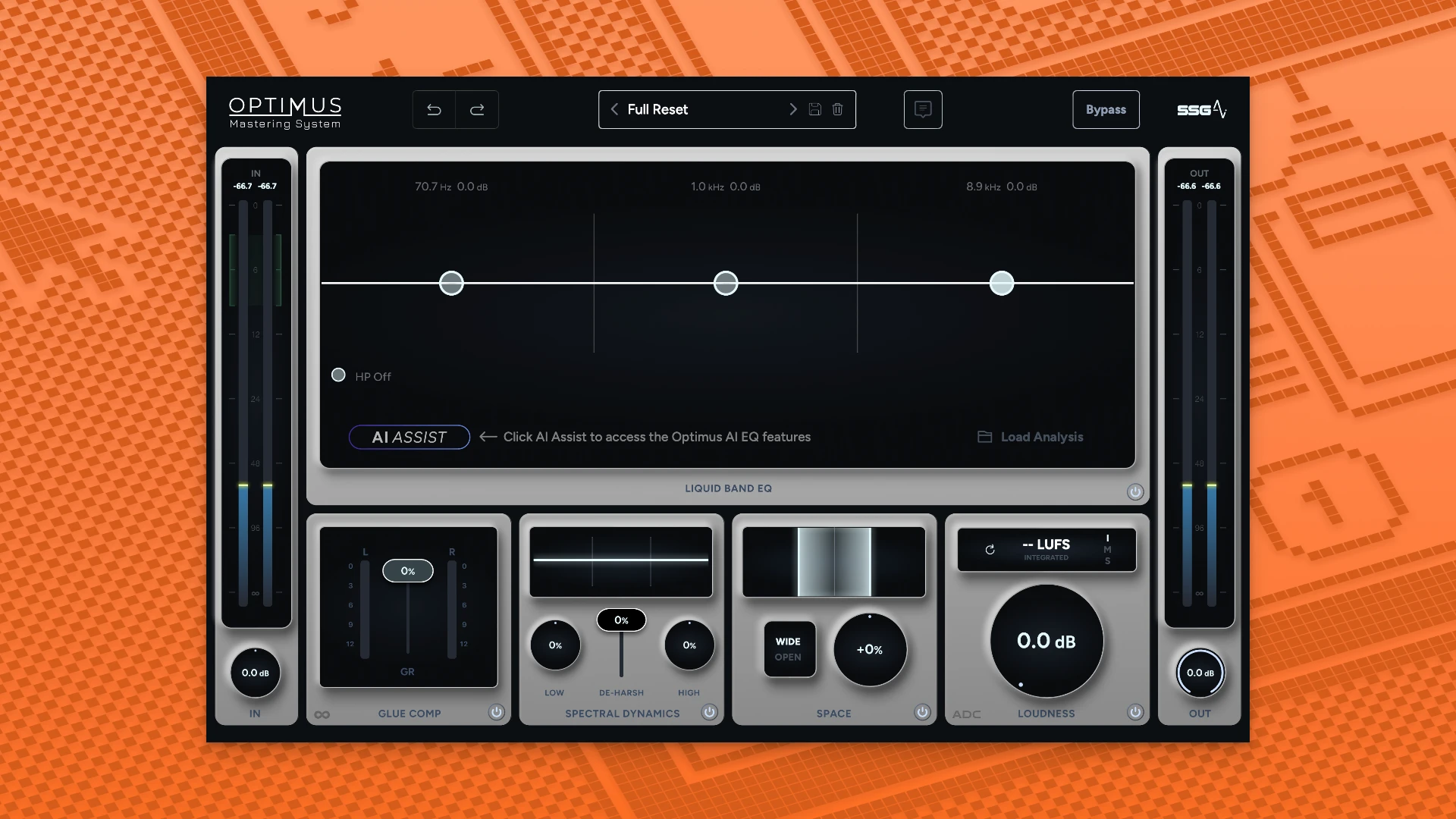
Use Realtime Dynamic AI to optimize punch and loudness without distortion, and Spectral Analysis AI to adjust frequency balance.

  • Creative Control:

You retain control over the final EQ, compression, and width while the AI manages technical chores.

  • Liquid Band EQ:

A mastering-grade, analog-modeled EQ that dynamically adjusts to the demands of the track to guarantee it works well on various playback platforms.

  • Dynamic & Space Modules:

Contains a Space control to expand the stereo field without sacrificing mono compatibility, an Infinite-Knee Glue Compressor for coherence, and Spectral Dynamics for reducing harshness.

  • Integrated LUFS Meter:

Assists you in meeting professional loudness goals right within the plugin.

Details

Version 1.5.143
Developer Sage Audio
Activation (RG) English
Compatibility macOS 10.12 and later
Size 58 MB
Architecture ARM , x86 (64-bit)
Interface Language English

FAQ

Installation and activation instructions are included in the package (inside).
There are so many errors, we can't list them all here. Therefore, we've described all the solutions (with pictures) in the article: Errors when installing applications on a Mac
Official updates may result in loss of activation unless otherwise stated in the installation instructions. To update the software from this website, you must download the new version of the software from here (if available) and install it over the version currently installed on your computer. This will preserve your activation and settings for the software. Read more in the article: Updating pirated apps
To download large files, it is recommended to use any download manager, for example, FDM (Free Download Manager) For downloading from a file sharing service like Filen.io, it's not recommended to use Safari. Use Google Chrome or the aforementioned FDM browser, for example. To download files via torrent (.torrent file), you need a torrent client, such as Transmission or the aforementioned FDM. Please remember that providers may block access to some websites (1fichier.com, etc.). To bypass these blocks, it is recommended to use a VPN.
The site administration doesn't hack anything. That's the job of release teams and some enthusiasts. They're the ones responsible for ensuring updates are available. But you can hack software yourself by learning reverse engineering.
Definitely not in the comments. The site administration doesn't hack anything, and there's no order desk. However, you can order the software you need (not for free) in a special thread on forum.ru-board.com.
Open System Preferences -> General > Language & Region -> Applications - “+”. Select an app and language. This method works for most apps. The language in Adobe products is usually selected during the installation of the product itself. The language in games is usually changed in the game settings itself. There are exceptions. Don't hesitate to search for information online.
There are many options. The easiest is to use specialized app removal utilities, such as App Cleaner & Uninstaller. To remove Adobe products, use the Creative Cloud Cleaner Tool.
The site offers a paid service: remote assistance (via AnyDesk, Zoom, Skype) with the installation of any applications (not just those from this site) on any Mac or PC. Learn more...

Leave a Comment

Version 1.5.143
Developer Sage Audio
Interface language English
Activation (RG) English
Compatibility macOS 10.12 and later
Architecture ARM , x86 (64-bit)
Size 58 MB
No threats found. Read more…
Published (edited): May 31, 2026 Views: 2