
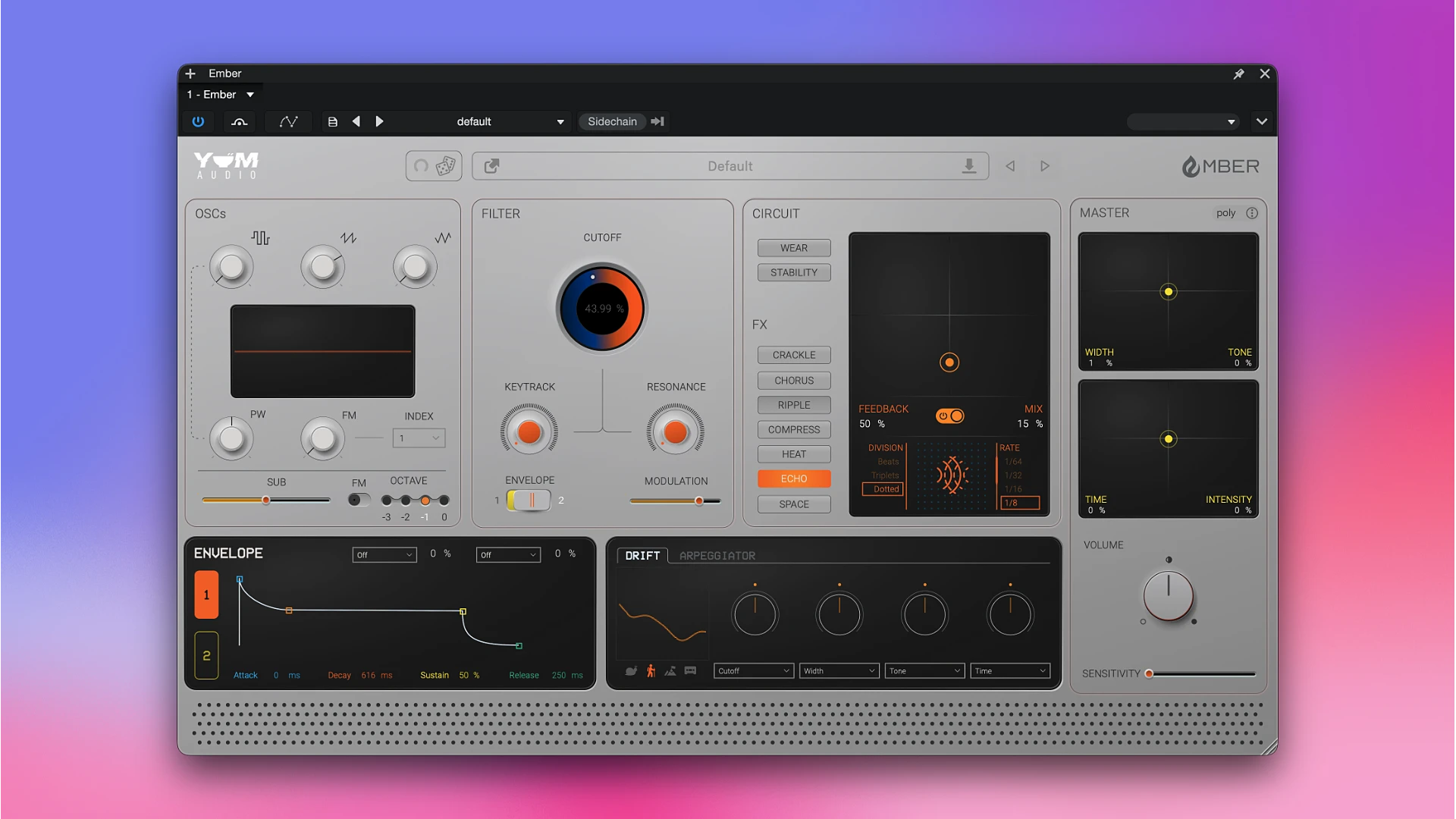
Ember by Yum Audio is a creative tool that gives your sound warmth, personality, and a subtle, gritty texture evocative of old-fashioned analog equipment.

Similar to magnetic tape, the plugin smoothes out sharp edges, softly saturates the signal, and gives the recording a warm, nostalgic taste that makes it more vibrant and expressive.

You can adjust the impact level using straightforward parameters, ranging from a mild enhancement of the sound to a brilliant, distinctive distortion that transforms a regular recording into an antique relic.

Ember can be used to create ambient background layers and experimental effects in electronic music, as well as to provide a warm tone to guitars and voices.

Without the need for intricate technical settings or an in-depth understanding of sound design, the tool enables you to swiftly establish the ideal mood and give your compositions depth and personality.

Important Characteristics:

  • Flame-grilled oscillators:  Saw, square, and triangle are the three waveforms that may be chosen.
  • They have FM capabilities, pulse width, and an integrated sub-oscillator for additional low-end thickness.
  • Circuit & age Controls: Using integrated age, rust, and stability settings, it mimics the erratic, worn-in sound of analog devices, tape cassettes, and porta-studios.
  • Drift Engine: Enhances your sounds with dynamic, organic modulation, adding flaws and natural pitch changes that give patches life.
  • Crackle, Ripple, Chorus, Compressor, Heat (Saturation), Echo, and Space are just a few of the integrated effects included in the Creative FX Suite.
  • Master Controls: An easy-to-use XY pad that allows you to easily adjust stereo width and overall tone (brightness).
  • Large Preset Library: More than 200 expertly created presets from renowned sound designers and artists like Craig Bauer, Stimming, and Mr. Bill.

Details

Version 1.0.1
Developer Yum Audio
Activation (RG) K'ed by Team X-db
Compatibility macOS 10.13 and later
Size 64 MB
Architecture ARM , x86 (64-bit)
Interface Language English

FAQ

Installation and activation instructions are included in the package (inside). If problems arise, block internet access.
There are so many errors, we can't list them all here. Therefore, we've described all the solutions (with pictures) in the article: Errors when installing applications on a Mac
Official updates may result in loss of activation unless otherwise stated in the installation instructions. To update the software from this website, you must download the new version of the software from here (if available) and install it over the version currently installed on your computer. This will preserve your activation and settings for the software.
To download large files, it is recommended to use any download manager, for example, FDM (Free Download Manager) For downloading from a file sharing service like Filen.io, it's not recommended to use Safari. Use Google Chrome or the aforementioned FDM browser, for example. To download files via torrent (.torrent file), you need a torrent client, such as Transmission or the aforementioned FDM. Please remember that providers may block access to some websites (1fichier.com, etc.). To bypass these blocks, it is recommended to use a VPN.
The site administration doesn't hack anything. That's the job of release teams and some enthusiasts. They're the ones responsible for ensuring updates are available. But you can hack software yourself by learning reverse engineering.
Definitely not in the comments. The site administration doesn't hack anything, and there's no order desk. However, you can order the software you need (not for free) in a special thread
Open System Preferences -> General > Language & Region -> Applications - “+”. Select an app and language. This method works for most apps. The language in Adobe products is usually selected during the installation of the product itself. The language in games is usually changed in the game settings itself. There are exceptions. Don't hesitate to search for information online.
There are many options. The easiest is to use specialized app removal tools, such as App Cleaner & Uninstaller. To remove Adobe products, use the Creative Cloud Cleaner Tool.
The site offers a paid service: remote assistance (via AnyDesk, Zoom, Skype) with the installation of any applications (not just those from this site) on any Mac or PC.

Leave a Comment

Version 1.0.1
Developer Yum Audio
Interface language English
Activation (RG) K'ed by Team X-db
Compatibility macOS 10.13 and later
Architecture ARM , x86 (64-bit)
Size 64 MB
No threats found. Read more…
Published (edited): May 23, 2026 Views: 16