
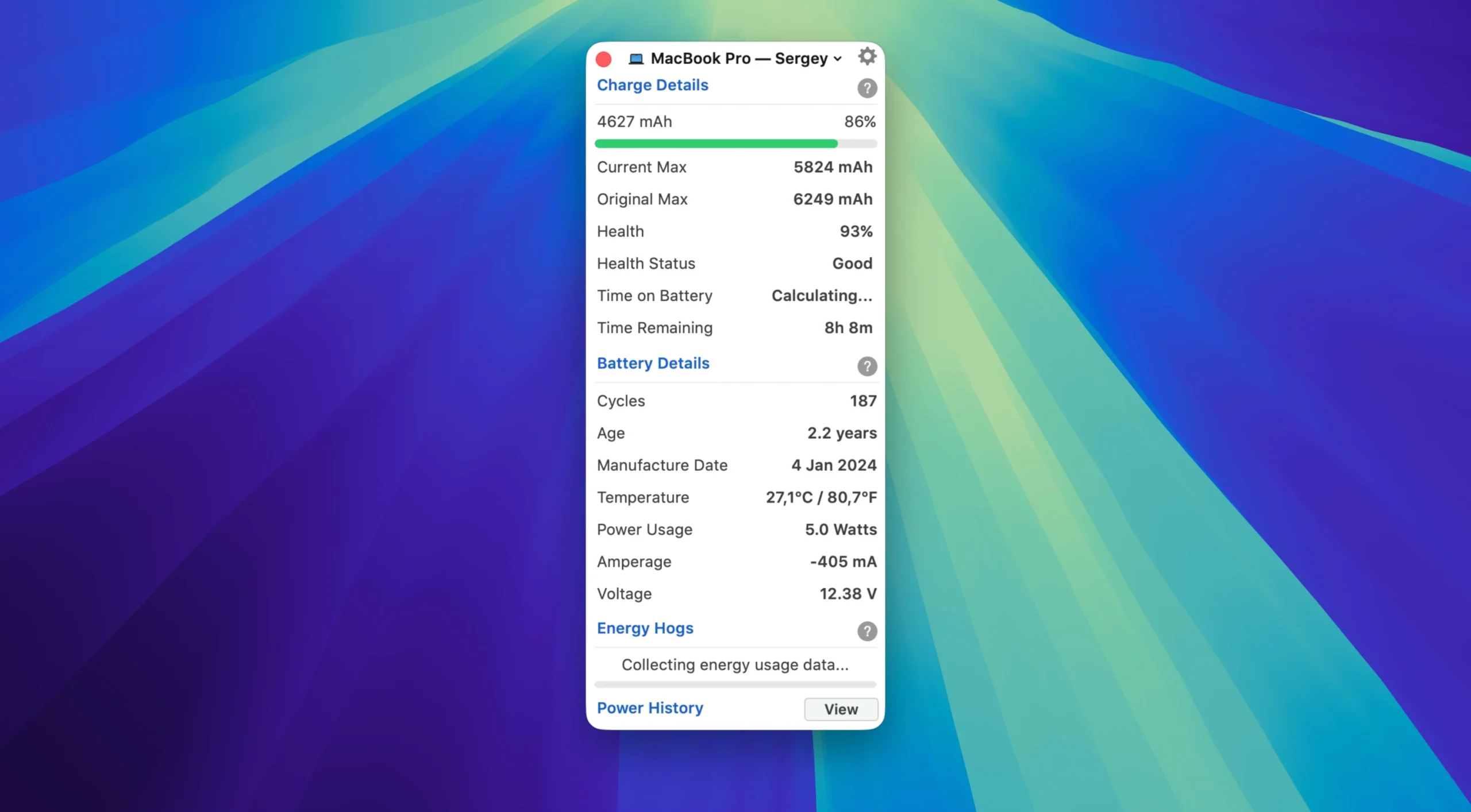
The Battery Health app is a tool for monitoring the battery health of your MacBook, as well as the batteries of connected iPhones and iPads. It provides data on charge cycles, temperature, and actual capacity. It also lets you monitor app power consumption and charge Bluetooth accessories directly from the menu bar.

Key Features:

  • Battery Health Monitoring
  • Health Percentage: The ratio of the current maximum capacity to the original capacity
  • Capacity: Displays the current capacity (mAh) and the original capacity
  • Status: Resets the indicator (“Good,” “Service Recommended,” etc.)
  • Charge Cycle Counter and Battery Manufacturing Date

Detailed Technical Information

  • Battery Temperature (°C/Fahrenheit)
  • Power Consumption (Watts)
  • Voltage (mV) and Current (mA)
  • Real-Time Charging Status

Power Consumption Analysis

  • Power-hungry Apps: List of the most power-hungry apps with their Process ID (PID) and impact level
  • Quickly close power-hungry processes to extend battery life
  • Graphs and History
  • Three graph types: Power Consumption, Battery Level, and Battery Health History
  • Display Periods: Day, Week, Month, Year
  • Battery Life, Full Charge, and Charging Process Statistics

iOS Compatibility

  • Connect your iPhone or iPad via USB or Wi-Fi, and Battery Health 3 will display:
  • Battery capacity and percentage
  • Number of charge cycles and device age
  • Temperature and manufacturing date
  • Current power consumption

Details

Version 3.01
Developer FIPLAB Ltd
Activation (RG) K'ed by TNT team
Compatibility macOS 12 and later
Size 15 MB
Architecture ARM , x86 (64-bit)
Interface Language English
Voice Languages English

Download Options

FAQ

Mount the image and run Open Gatekeeper friendly. Press Enter to bypass Gatekeeper in the Terminal window. Drag the application to the Applications folder. The application is ready for use.
There are so many errors, we can't list them all here. Therefore, we've described all the solutions (with pictures) in the article: Errors when installing applications on a Mac
Official updates may result in loss of activation unless otherwise stated in the installation instructions. To update the software from this website, you must download the new version of the software from here (if available) and install it over the version currently installed on your computer. This will preserve your activation and settings for the software.
To download large files, it is recommended to use any download manager, for example, FDM (Free Download Manager) For downloading from a file sharing service like Filen.io, it's not recommended to use Safari. Use Google Chrome or the aforementioned FDM browser, for example. To download files via torrent (.torrent file), you need a torrent client, such as Transmission or the aforementioned FDM. Please remember that providers may block access to some websites (1fichier.com, etc.). To bypass these blocks, it is recommended to use a VPN.
The site administration doesn't hack anything. That's the job of release teams and some enthusiasts. They're the ones responsible for ensuring updates are available. But you can hack software yourself by learning reverse engineering.
Definitely not in the comments. The site administration doesn't hack anything, and there's no order desk. However, you can order the software you need (not for free) in a special thread on forum.ru-board.com.
Open System Preferences -> General > Language & Region -> Applications - “+”. Select an app and language. This method works for most apps. The language in Adobe products is usually selected during the installation of the product itself. The language in games is usually changed in the game settings itself. There are exceptions. Don't hesitate to search for information online.
There are many options. The easiest is to use specialized app removal tools, such as App Cleaner & Uninstaller.

Leave a Comment

Version 3.01
Developer FIPLAB Ltd
Interface language English
Activation (RG) K'ed by TNT team
Compatibility macOS 12 and later
Architecture ARM , x86 (64-bit)
Voice Languages English
Size 15 MB
No threats found. Read more…
Official website
Published (edited): March 23, 2026 Views: 147




